In this article
Keyword research for one location is straightforward. For thirty it becomes a different job, and the usual approach, which is to take the main service terms and paste a town name after each one, produces a lot of pages that rank for nothing.
The mistake almost everyone makes
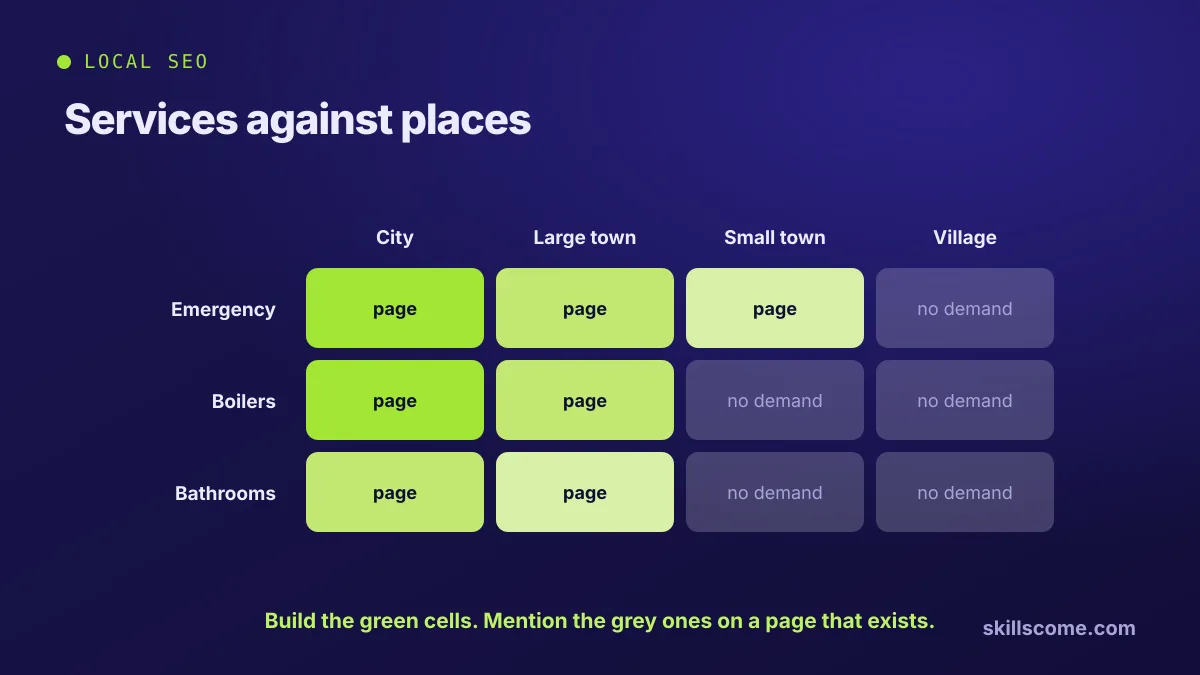
Assuming demand is even. It is not. "Emergency plumber" plus a city of a million people is a real search with real volume. The same phrase plus a village of four hundred has never been searched by anyone, and a page built for it is a thin page that drags the rest of the site down.
The second mistake is assuming the service mix is the same everywhere. A firm might do mostly commercial work in one city and mostly domestic in the next. The keyword set should follow that, and only the firm knows it.
Build the grid first
Before touching a tool, make a simple table. Services down the side, locations across the top. Now fill in three things from your own records, not from a keyword tool:
- Where you already get work, by service and by area
- Where you want work and currently get none
- Where you would not take the job even if it came in
That last row saves more time than anything else. There is no point researching areas you cannot service.
Finding where demand actually exists
- Research the service terms once, without any location. This gives you the vocabulary: what people call the thing you do, and which variant is dominant.
- Test location volume on your biggest service only. Take one term, run it against every town on your list, and see where the numbers stop being real. That cut-off is roughly the same for your other services.
- Check the suggestions, not just the volumes. Type the service into Google and see which places it offers you. Those are places people genuinely pair with that service.
- Look at who is ranking per town. Some areas are held by national directories, some by one local firm, some by nobody. The last group is where to start.
- Group the leftovers. Villages with no individual demand still belong on a page, as part of an area that does.
The rule of thumb
If a place has no measurable volume for your main service, it does not need its own page. It needs a mention on the page for the area that contains it.
When towns use different words
This is the part tools will not tell you and locals know instantly. The same service is called different things in different places, and sometimes the place itself has several names in use. A region, a council area, a postal town and the name residents actually say can all be different, and only one of them gets searched.
Two quick checks: look at how competitors who clearly live there word their pages, and read local community posts on the subject. The vocabulary that appears there is the vocabulary to use.
How many pages to build
Fewer than the grid suggests, and each one properly.
- One page per service per major area where there is real demand and you genuinely operate.
- One page per area for smaller places, covering several services, naming the villages inside it.
- No page at all for anywhere with no demand and no work. Add it to a list on an existing page instead.
Every page has to carry something specific: the actual team covering it, jobs done there, travel times, local regulations, prices if they differ. If the only thing changing between two pages is the place name, you have built duplicate content with extra steps, and Google will pick one and ignore the rest. The same reasoning applies to product pages, which we covered in product descriptions Google has not already seen.
Checking rankings per location
Your normal search results are useless here, because Google weights how close you are. Searching from your office will always show you in a flattering position.
- Use a rank tracker with location settings, and check from each target area rather than from one point.
- Read Search Console by query and page, which shows what each location page actually gets impressions for, as opposed to what you hoped.
- Watch impressions before position. A new area page gaining impressions at position 40 is working. It is early, not broken.
- Check the map pack separately. It has its own ranking logic and is driven by your Google Business Profile, not the page. Is local SEO dead goes through how that fits together.

Ijaz ul Haq
Founder of SkillsCome. Doing SEO since 2021, with 500+ SEO projects delivered and Top Rated status on Fiverr and Upwork. Runs and ranks his own stores in English, Spanish and Turkish.